
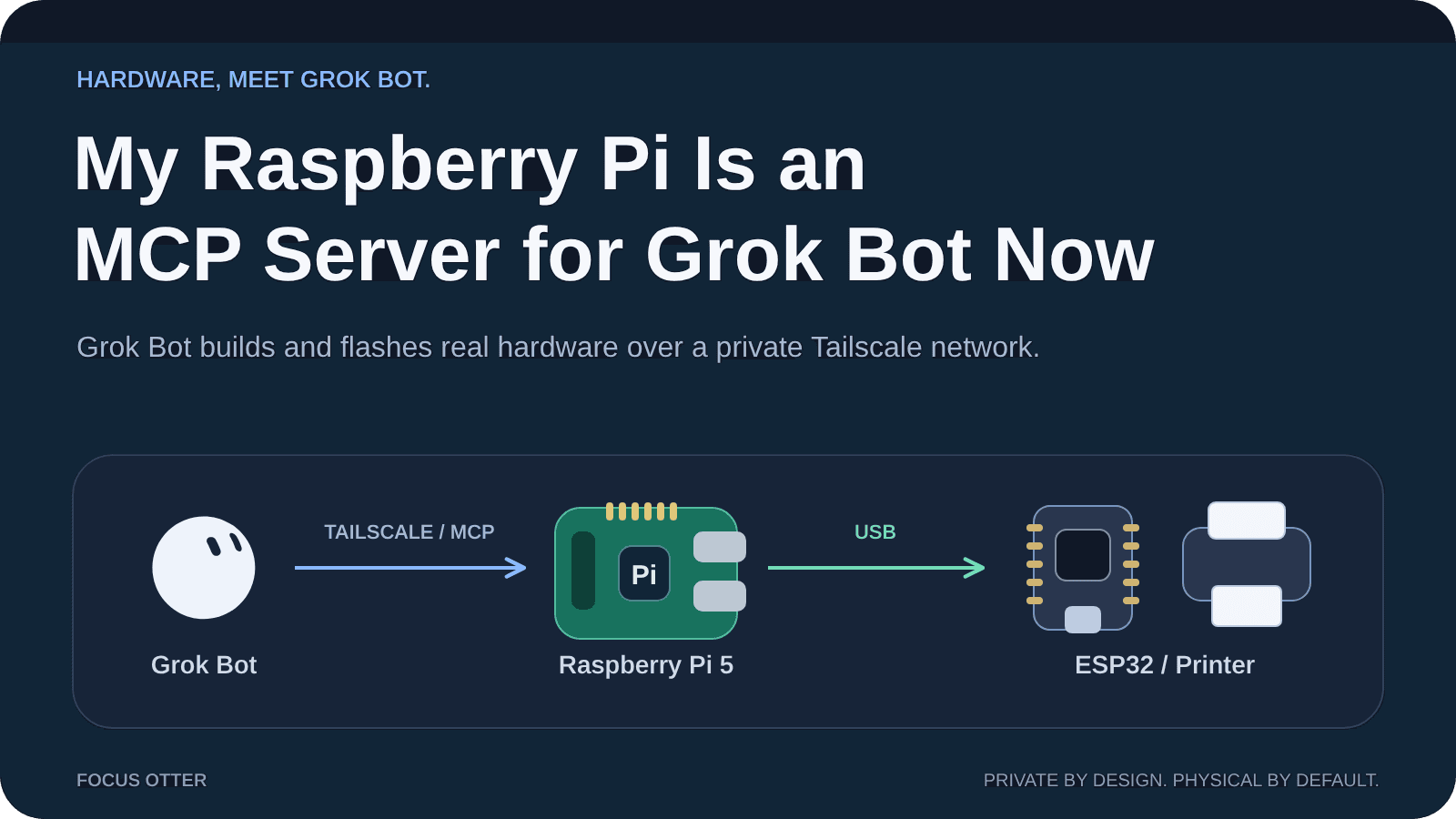
My Raspberry Pi Is an MCP Server for Grok Bot Now
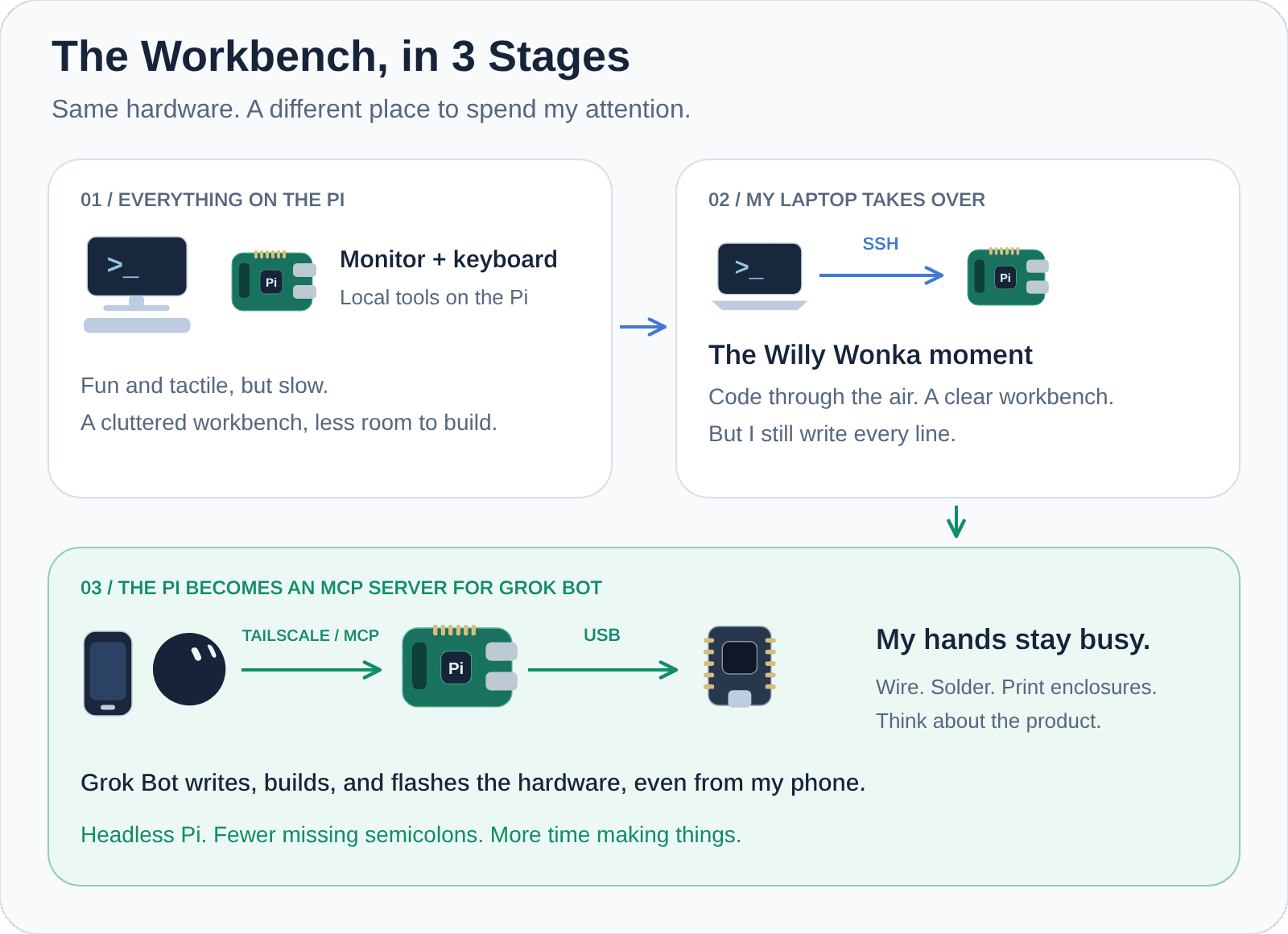
When I first started programming microcontrollers with my Raspberry Pi, I plugged a monitor and keyboard straight into it. Fun, tactile, and a little slow. It also took up the workbench space I actually needed for breadboards and a soldering iron.
Then I ditched the monitor and started SSH-ing in from my MacBook Pro. That felt like Willy Wonka television: code moving through the air from my laptop to a little computer across the room. I felt like an untethered hacker. Better, but I was still the one writing every line and hunting down missing semicolons.
Today, my Pi 5 is plugged into the wall, completely headless, running as an MCP server for Grok Bot. Grok Bot writes the code, pushes the files, flashes the board, and checks how the hardware responds. I get to wire microcontrollers, solder, 3D print enclosures, and think about how to deliver the actual product.
The computer didn't disappear. It just stopped being the center of the workbench.
In this post, I'll walk through how this workflow fits together: why I picked Tailscale, why MCP instead of just SSH, and what Grok Bot actually set up on the Pi.
The Workbench, in 3 Stages
Let's say you're building an ESP32 sensor. Or a tabletop Pi 5 and thermal receipt printer photo booth, in the spirit of Wes Bos's thermal printer project. Someone still needs to plug things in, check the wiring, and probably notice that the enclosure doesn't fit.
That someone is me.
But writing firmware and flashing a board? Grok Bot can handle that. I have two agents inside Grok Bot: one focused on hardware and 3D-printed builds, and another focused on fullstack apps. They share the Pi as a hardware workbench, even with my laptop lid closed.
🗒️ This pattern isn't exclusive to Grok Bot. Any agent that can talk to an MCP server over your private network can use it. Grok Bot is just what runs my setup, and it makes this part really easy.
Why Tailscale Instead of ngrok
I want to be fair to ngrok here, because it has a real advantage: a public HTTPS endpoint is easy to reach from almost anywhere. It also supports authentication and access policies. A public tunnel doesn't have to mean an unprotected endpoint.
But I didn't want a public endpoint at all.
Tailscale creates a private network between your devices. Devices join with an identity, and grants decide which connections they're allowed to make. No router port forwarding. No public URL that just happens to be hard to guess.
I've spent a lot of time on identity at Auth0, so this is the part I care about: which device is allowed to reach my workbench? With Tailscale, that's a question with a real answer.
It also means the Pi keeps the same address whether it's on my desk or in a backpack at a conference. Plug it into hotel Wi-Fi and it just shows back up. Captive portals still exist. Unfortunately.
Why MCP Instead of Just SSH
Now, if you're thinking why not just let the agent SSH in? I had the exact same thought.
And I still use plain SSH from my MacBook Pro when I want to poke around myself. But Grok Bot works differently. If I installed Tailscale on Grok Bot's own computer, it would get wiped whenever that computer updates. Instead, Grok Bot provides a Tailscale connector that stays connected to my private network.
MCP is the other half. Instead of a raw terminal, Grok Bot gets a handful of named tools with clear inputs and results. Tailscale handles the private route. MCP describes what can travel over it.
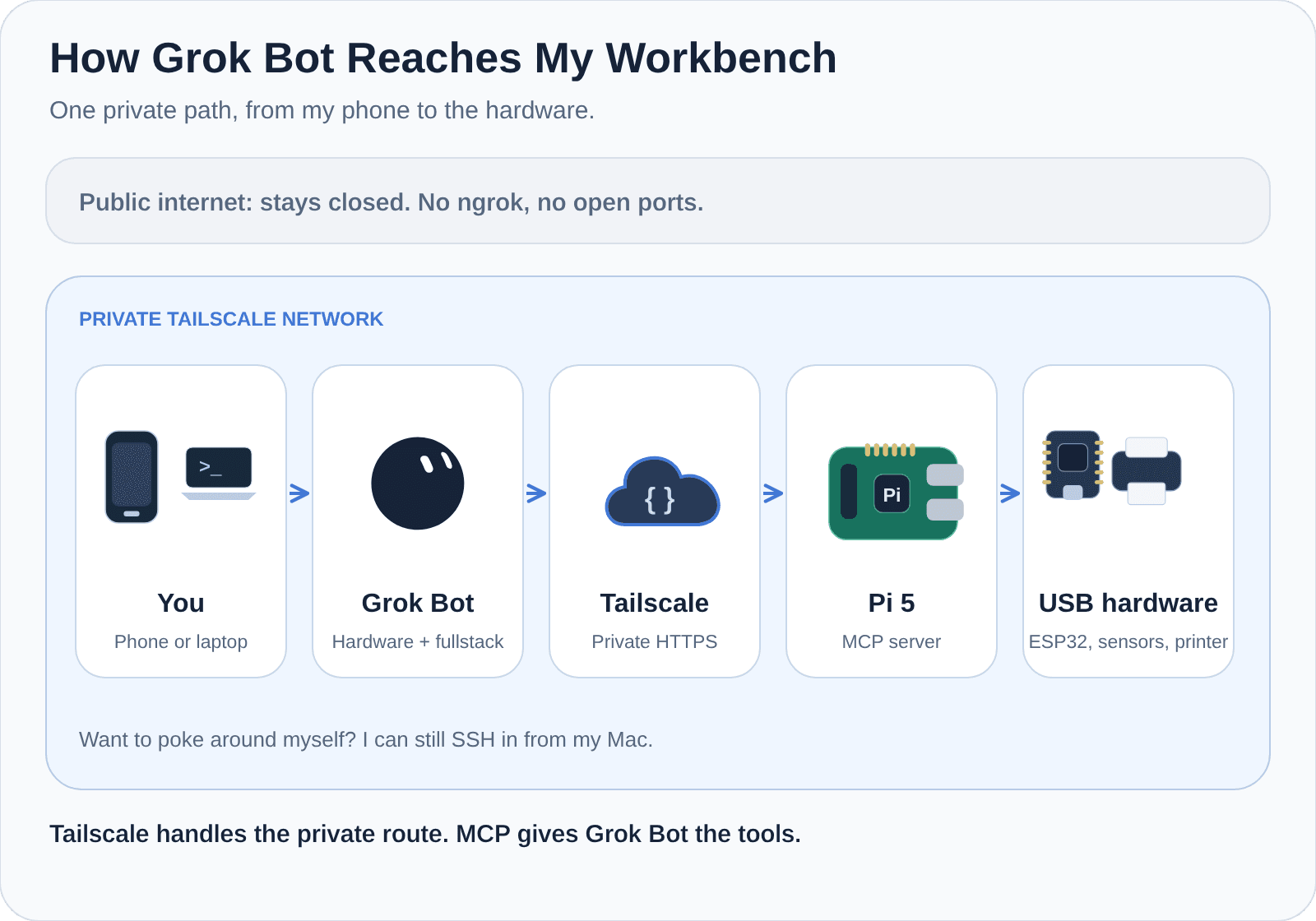
It works like this:
- Grok Bot uses its Tailscale connector to reach the MCP server on my Pi.
- Tailscale carries that request privately to the Pi. Nothing is exposed to the public internet.
- The Pi runs the requested tool: pushing code, compiling, or flashing whatever board is plugged into USB, then reports back what happened.
And here's the part I keep thinking about: I don't even need my laptop open.
I can stand at my workbench, holding a freshly soldered board, and kick off the whole build from my phone in the Grok Bot app. A minute later, the board is flashed and Grok Bot is telling me whether the sensor is actually responding 🤯
The MCP Server
Here's the funny part. I didn't write the MCP server.
Grok Bot did. I described what I wanted, gave it access to the Pi, and it wrote the Python server, set it up to start on boot, and wired it into Tailscale. No boilerplate. No config files I had to look up. Which is kind of the whole point of this post.
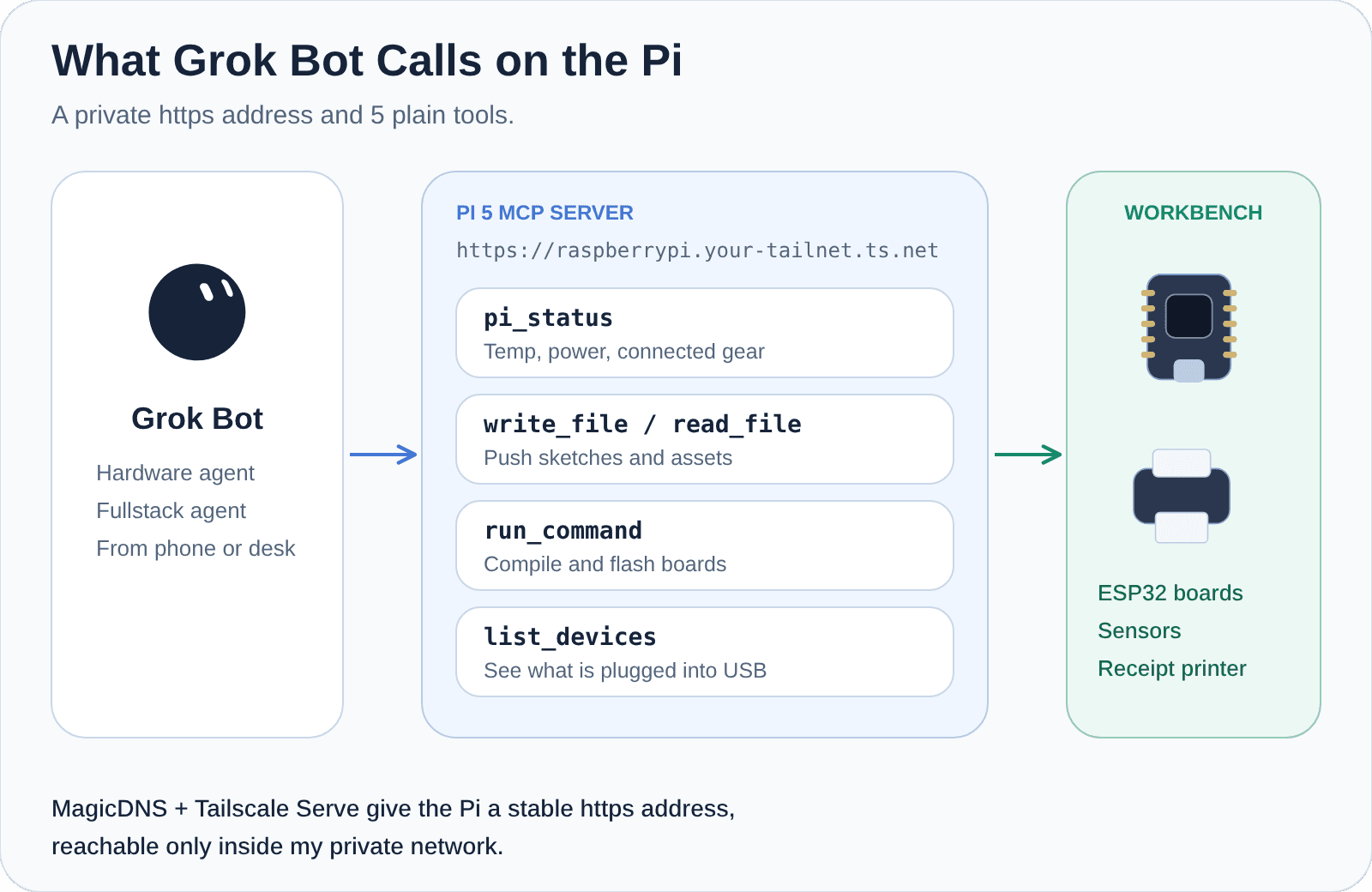
Tailscale's MagicDNS gives the Pi a friendly name, and Tailscale Serve gives it a real https:// address on top of that, something like https://raspberrypi.your-tailnet.ts.net/mcp. It stays the same wherever the Pi goes, and it only works for devices inside my private network.
The tools Grok Bot created are refreshingly plain:
pi_status- Checks the Pi's temperature, power, and what gear is connected. Basically, "is everything OK before we start?"write_file/read_file- Pushes sketches, configs, and assets onto the Pi, and reads them back.run_command- Compiles the firmware and flashes the board.list_devices- Sees what's plugged into USB and checks that it's actually responding after a flash.
That's it! 🎉 A handful of little tools, and my Pi went from a computer on my desk to a hardware workbench Grok Bot can use from anywhere on my network.
What Comes Next
Right now, both of my agents in Grok Bot share the same broad set of tools on my personal Pi. On a solo workbench, that's exactly what I want. It's fast, and I'm the only one around to notice when something goes sideways.
But wearing my Auth0 hat, this is where things get really interesting. Should an agent need my approval before it flashes a board? Should the fullstack agent be able to read files but not run commands? Those are fine-grained permission questions, just pointed at physical hardware instead of an API.
There's also coordination. What happens when both agents want the same board at the same time? Somebody has to wait their turn.
And then there's the plain real-world stuff. Hardware has opinions. A tired microSD card can make a reboot drag, and no amount of clever tooling fixes a loose jumper wire 😅
Conclusion
In this post, we covered how I went from a monitor on my workbench, to SSH from my laptop, to a headless Pi that Grok Bot uses as an MCP server over Tailscale. Tailscale gives Grok Bot a private route to the Pi. MCP gives it tools. The Pi gives those tools a USB cable into the real world.
The best part isn't that an agent can run a command. It's that I get to stay focused on the wiring, the enclosure, and the thing I'm actually trying to ship.
In part, this feels like the future, but in truth, it's a direct showcasing of where we are today.
If you enjoyed this post, I'd love to hear from you. Please drop a comment below or reach out on X or LinkedIn. And if you want a follow-up on adding approvals for physical actions, let me know and I'll write it.
Until next time, Happy Building 🦦