
Protecting an API Gateway REST API with Auth0 (and Otters)
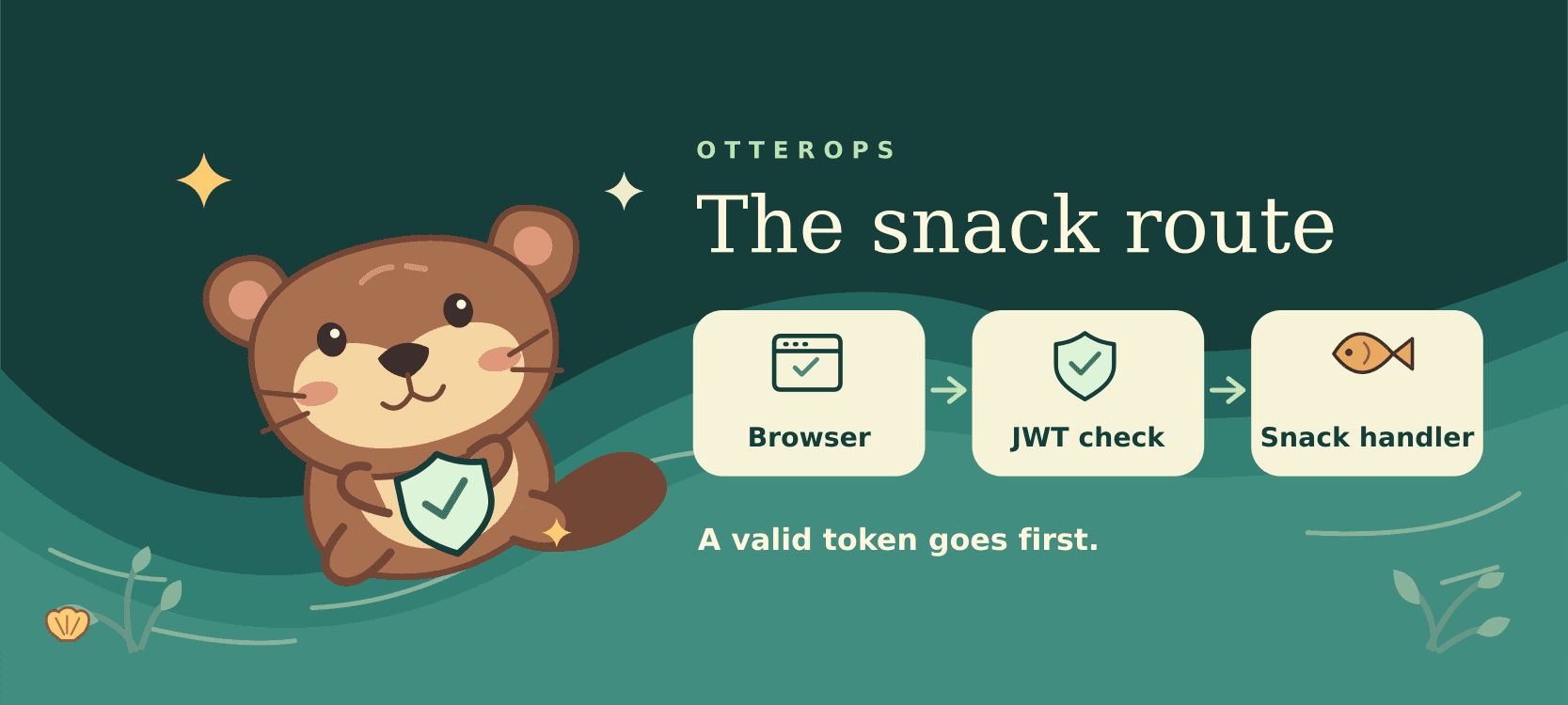
Anyone should be able to look up an otter fact. I’d be a little more selective about who gets to feed one.
Meet Miso. Miso is one of the otters in Otter Ops. The demo is a Next.js app that signs people in with Auth0 and calls Amazon API Gateway directly from the browser.
What changed for REST APIs
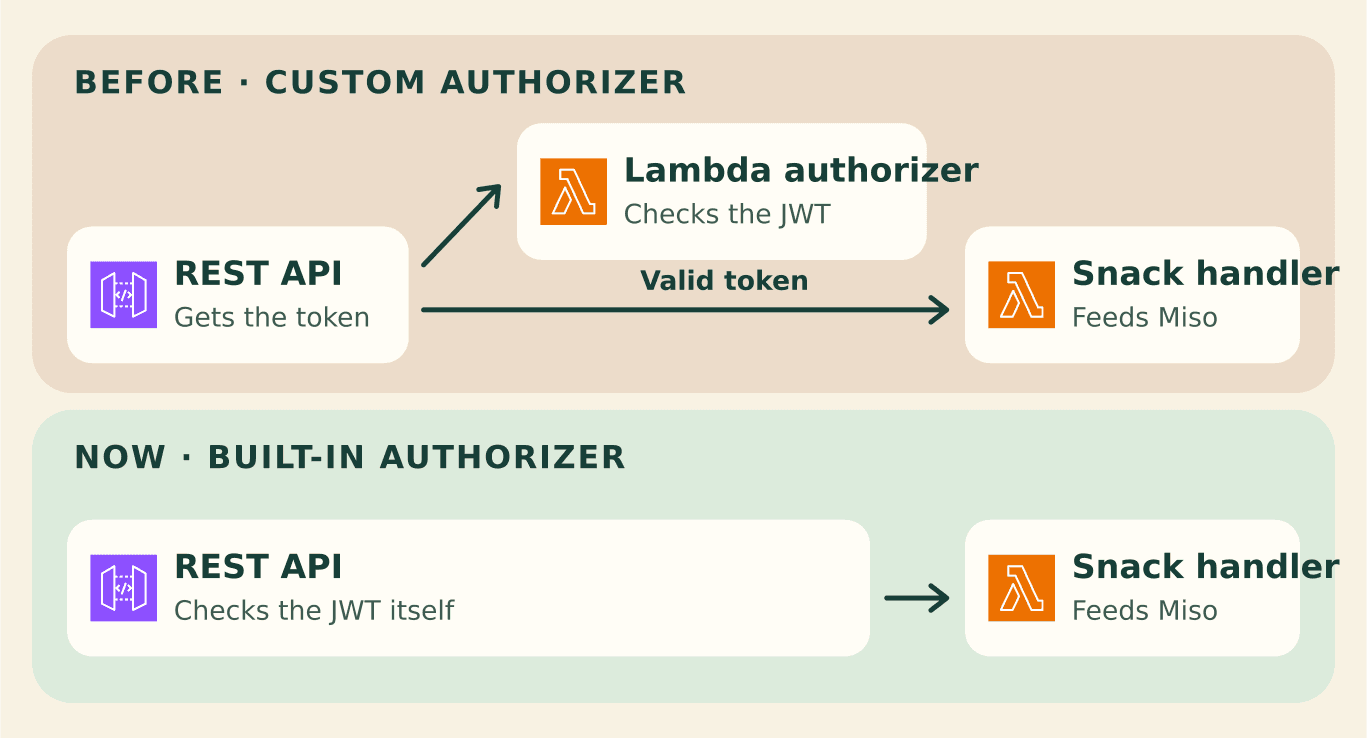
I used a built-in JWT authorizer on an HTTP API in my Auth0 interview demo. For a REST API, you could do the same token check with a custom AWS Lambda authorizer. Now REST APIs can check JWTs themselves. The Lambda that hands out snacks still has a job.
What the browser calls
| Request | Who gets through? |
|---|---|
GET /otters/facts | Anyone. No access token required. |
GET /otters | A caller with a valid access token for this API. |
POST /otters/{id}/snacks | A caller with a valid access token and the feed:otters scope. |
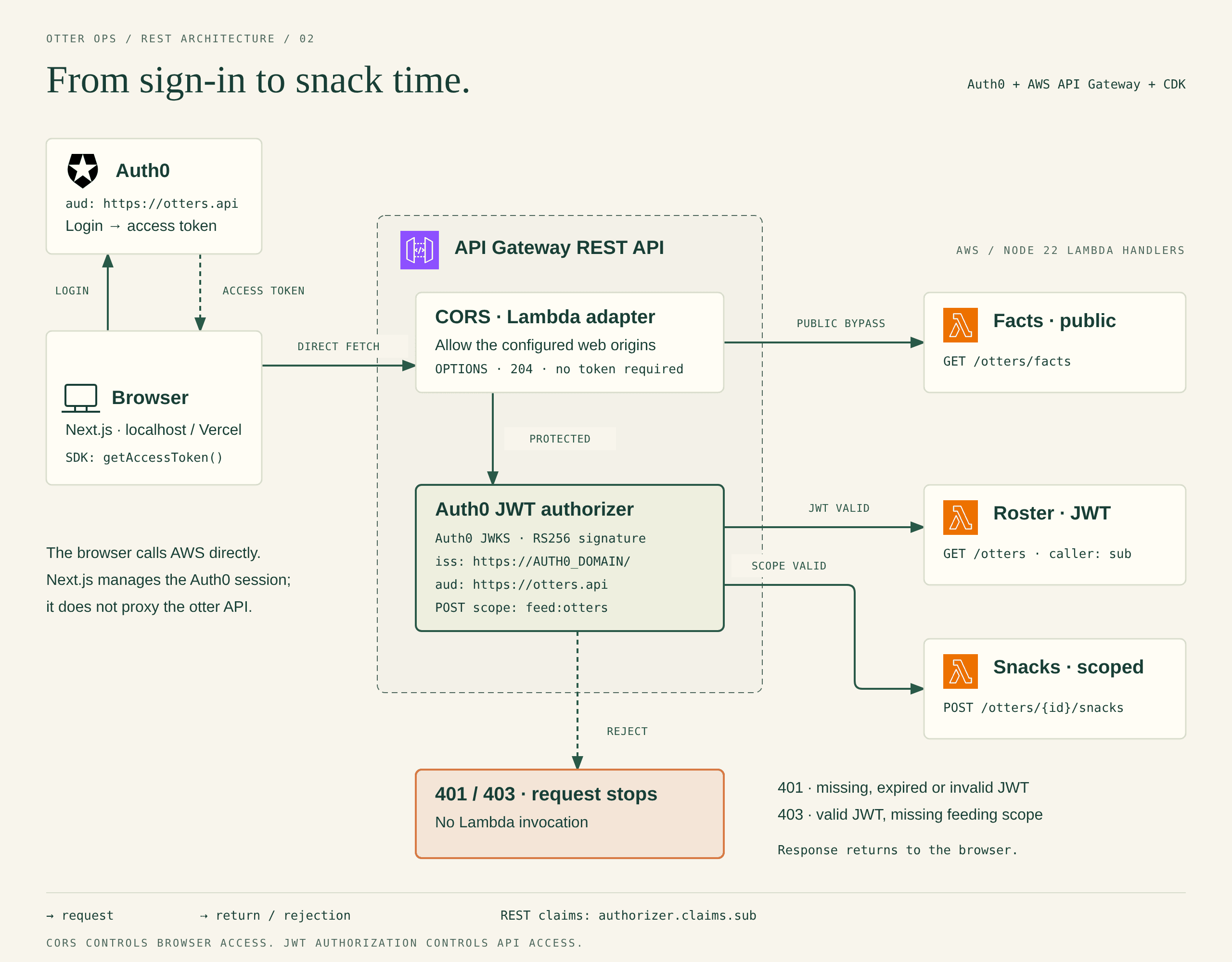
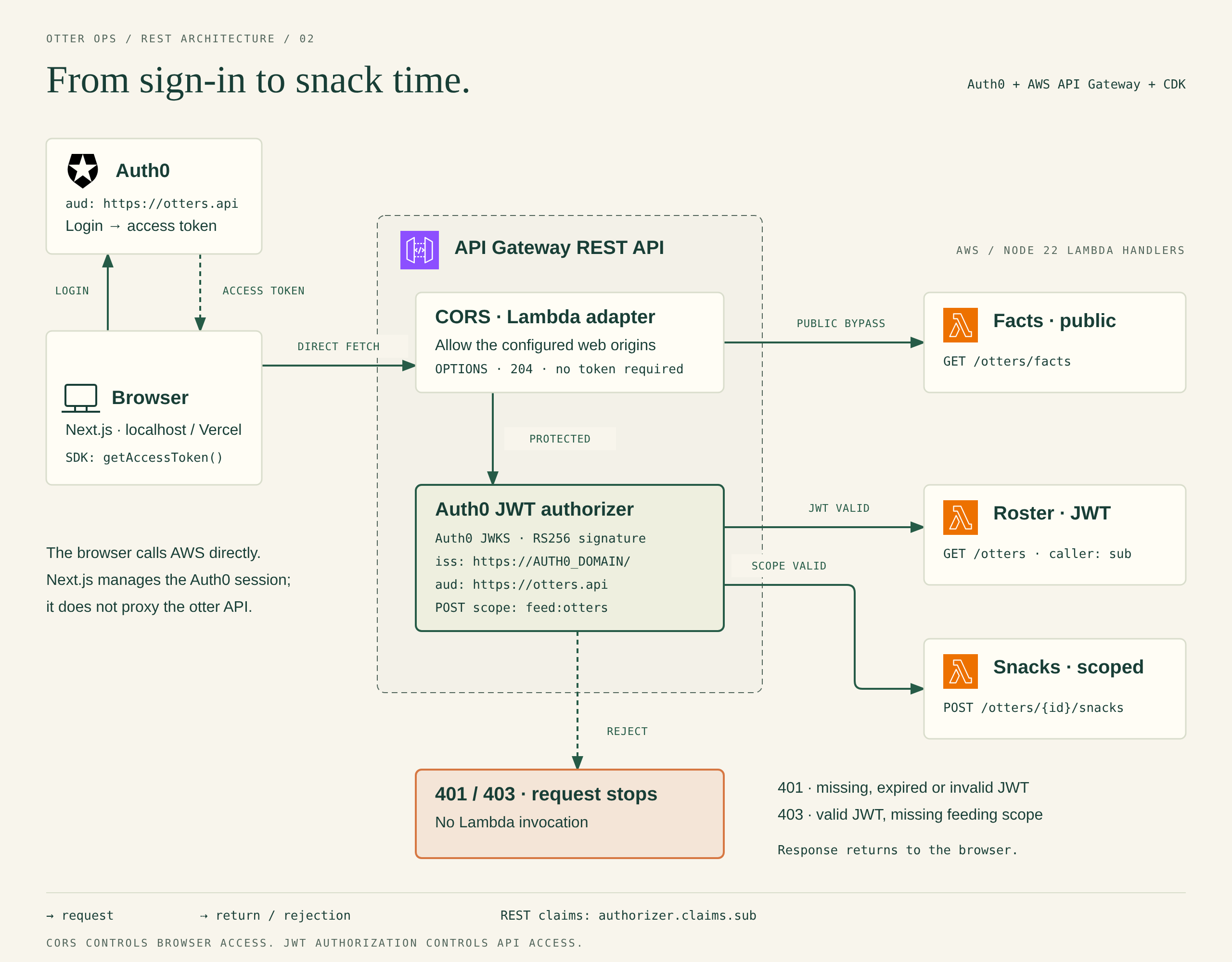
Next.js handles the Auth0 session. The browser gets an access token through the Auth0 SDK and calls API Gateway directly. The gateway checks the token before it invokes Lambda on a protected method. The facts method skips JWT authorization entirely.

Give Auth0 an API to issue tokens for
Create a Regular Web Application and a custom API in Auth0. The demo uses https://otters.api as the API identifier. It doesn’t need to point to a website. It just needs to be the same value the app requests and the gateway expects. Use RS256 and turn on role-based access control (RBAC). Create a feed:otters permission and give it to only one of your test users.
In the Next.js Auth0 setup, the app asks for permission to feed otters at sign-in. Auth0 only puts that permission in an access token if the user has it.
Here’s the browser request inside an async snack handler. Import getAccessToken from @auth0/nextjs-auth0 and pass the otter’s id and the snack to the handler. See how it fits into the demo’s frontend.
const token = await getAccessToken()
const apiUrl = process.env.NEXT_PUBLIC_API_URL

return fetch(`${apiUrl}/otters/${encodeURIComponent(id)}/snacks`, {
  method: 'POST',
  headers: {
    Authorization: `Bearer ${token}`,
    'Content-Type': 'application/json',
  },
  body: JSON.stringify({ snack }),
})
The token on line 1 is an access token. That’s what goes in the Authorization header. The ID token tells the app who signed in. It’s not the token to send to the API. Keep the Auth0 client secret on the server and don’t log access tokens.
Tell the REST API what to trust
The demo defaults to an HTTP API. To follow this walkthrough, use the REST variant. Here’s how its stack uses the AWS CDK to set up the authorizer:
const authorizer = new CfnAuthorizer(this, 'Auth0', {
  restApiId: api.restApiId,
  name: 'Auth0',
  type: 'JWT',
  identitySource: 'method.request.header.Authorization',
})

authorizer.addPropertyOverride('JwtConfiguration', {
  DefaultAlgorithms: ['RS256'],
  Issuers: [{ Issuer: `https://${domain}/`, Audiences: [audience] }],
})
The version of CDK in the demo doesn’t expose JwtConfiguration on its REST construct yet. The override emits the documented CloudFormation property directly. CDK’s bundled schema can flag that field during synth; the repo explains the warning.
API Gateway uses Auth0’s public keys to check that the token is real. The issuer is your Auth0 tenant URL. It has to match the token exactly, including the trailing slash. The audience is your API identifier (https://otters.api here). It’s not your app’s client ID.
To see the roster, you just need a valid access token. To feed Miso, that token also needs feed:otters. Set that requirement on the snack method only. If you list more than one scope on a method, a token only needs one of them.
Let the browser call the API
The app and API are on different origins. Before sending the snack request, the browser asks the API if it can send a request from the app’s origin with an Authorization header. That first check is called a preflight. There’s no token in it.
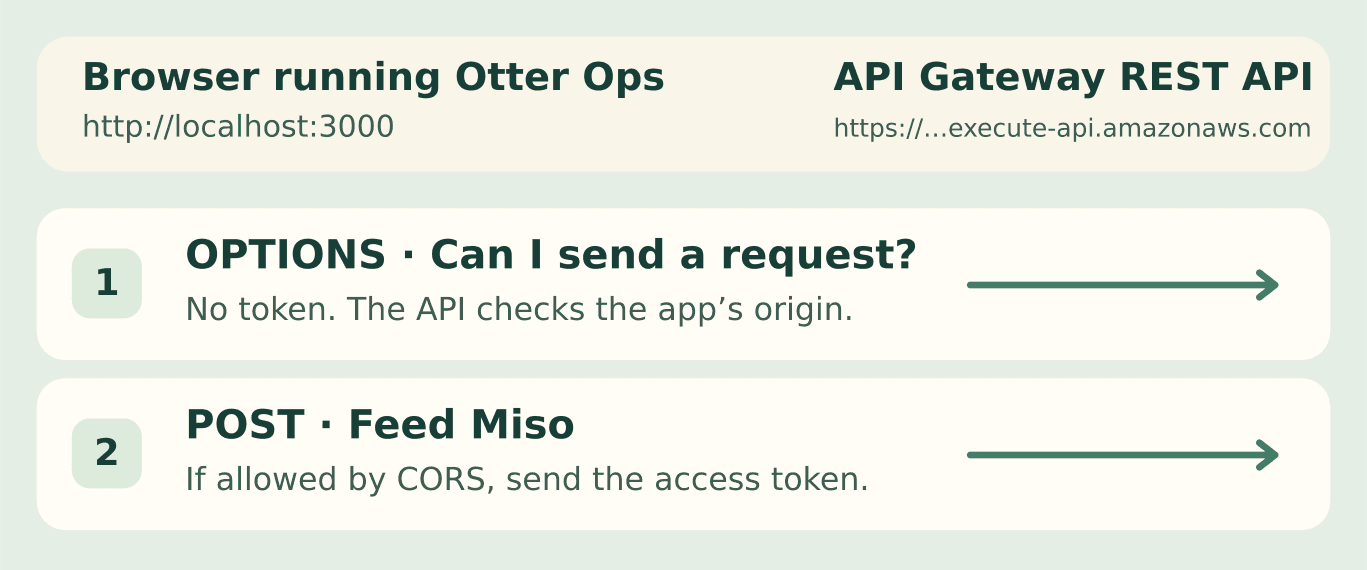
Set ALLOWED_ORIGINS to your web app’s origin. Leave OPTIONS open for the preflight. The REST stack also adds CORS headers to gateway errors so the app can read them.
CORS doesn’t make a public URL private. A non-browser client can call it from anywhere. The JWT authorizer is what stops that client from pulling the roster or feeding Miso without a token.
Try Otter Ops
- Follow the README’s Auth0 setup to make two test users. Give only one of them
feed:otters. - Run Otter Ops locally. Browse the facts while signed out. Then sign in as each user and see who can feed Miso.
- Want to try the gateway itself? Follow the README’s AWS deployment steps and select the REST stack.
The demo was tested with a real Auth0 tenant and a local stand-in for API Gateway. The REST stack hasn’t been tested on AWS.
Conclusion
API Gateway can check the access token on a REST API without a separate Lambda authorizer. The snack handler still hands out the snacks. CORS tells the browser whether it can make the call; it doesn’t decide who gets to feed Miso.
Until next time, Happy Building 🦦